

GitHub Actions
Ready-made Actions are available for GitHub Actions. In addition to the existing ones in your project, you'll need the following actions:
- setup-oras - used for installing dependencies
- ORAS Push Action - used for pushing artifacts to container registry
- ABCD Lite action - used for communicating with ABCD Lite and initializing deployment.
Globally, for the pipeline to work correctly, you need to create the following secrets before starting:
- REGISTRY_USERNAME - login for container registry
- REGISTRY_PASSWORD - password or token from container registry with push permissions
- ABCDLITE_DEPLOY_TOKEN - ABCD Lite deployment token
Other values are not sensitive and can be set in the pipeline env for convenience.
Deployment template
You can get pre-filled step template by clicking on GitHub icon near the IIS site name on the project card.
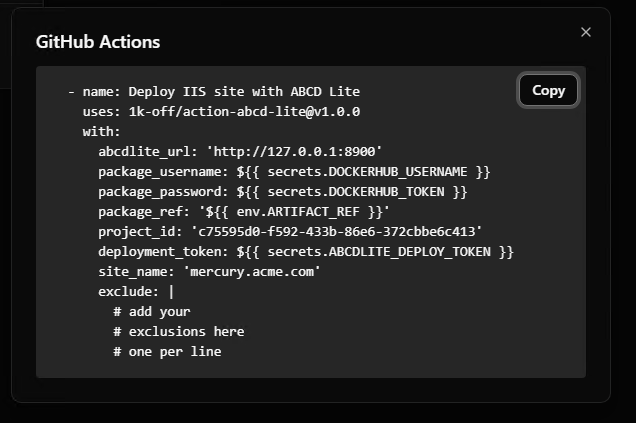
Pipeline Example
In this pipeline, compared to the template generated by ABCD Lite, some changes have been made, specifically: some values have been moved to the pipeline env for ease of use.
Do not forget to update pipeline env values before using this template.
This deployment template will remove everything from the deployment folder except exclusions.
name: Build and deploy
on:
  workflow_dispatch:

env:
  CSPROJ: Project.Presentation/Project.Presentation.csproj
  REGISTRY_URL: myregistry.azurecr.io
  ARTIFACT_REPOSITORY: acme/mercury
  ARTIFACT_DIRECTORY: artifacts
  ABCD_LITE_URL: https://abcd.acme.com
  ABCD_LITE_PROJECT_ID: c75595d0-f592-433b-86e6-372cbbe6c413
  ABCD_LITE_SITE_NAME: mercury.acme.com

jobs:
  version:
    name: "Set version"
    runs-on: ubuntu-latest
    outputs:
      version: ${{ steps.version.outputs.version }}
    steps:
      - name: Set version
        id: version
        run: |
          ver="$(date +%Y%m%d-%H%M)"
          echo "version=$ver" >> $GITHUB_OUTPUT

  build:
    runs-on: ubuntu-latest
    needs: [version]
    steps:
      - uses: actions/checkout@v4
      - name: Setup dotnet
        uses: actions/setup-dotnet@v4
        with:
          dotnet-version: 8
      - uses: oras-project/setup-oras@v1
        with:
          version: 1.2.3
      - name: Install dependencies
        run: dotnet restore
      - name: Build
        run: dotnet build ${{ env.CSPROJ }} --no-restore
      - name: Publish
        run: dotnet publish ${{ env.CSPROJ }} -o ${{ env.ARTIFACT_DIRECTORY }} --no-restore
      - name: Push Artifacts
        uses: 1k-off/action-oras-push@v1.1.1
        with:
          registry: ${{ env.REGISTRY_URL }}
          username: ${{ secrets.REGISTRY_USERNAME }}
          password: ${{ secrets.REGISTRY_PASSWORD }}
          repository: ${{ env.ARTIFACT_REPOSITORY }}
          tag: ${{ needs.version.outputs.version }}
          files: |
            ${{ env.ARTIFACT_DIRECTORY }}

  deploy:
    needs: [version, build]
    runs-on: ubuntu-latest
    steps:
    - name: Deploy IIS site with ABCD Lite
        uses: 1k-off/action-abcd-lite@v1.0.0
        with:
        abcdlite_url: ${{ env.ABCD_LITE_URL }}
        package_username: ${{ secrets.REGISTRY_USERNAME }}
        package_password: ${{ secrets.REGISTRY_PASSWORD }}
        package_ref: ${{ env.REGISTRY_URL }}/${{ env.ARTIFACT_REPOSITORY }}:${{ needs.version.outputs.version }}
        project_id: ${{ env.ABCD_LITE_PROJECT_ID }}
        deployment_token: ${{ secrets.ABCDLITE_DEPLOY_TOKEN }}
        site_name: ${{ env.ABCD_LITE_SITE_NAME }}
        exclude: |
            wwwroot/media/
            GeneratedPDF/
            SomeDLThatWasPlacedManuallyAndNeedToBeKept.dll
Assumptions made for this pipeline example:
- The solution file (.sln) is in the root of the repository.
- The target C# project is located at
Project.Presentation/Project.Presentation.csproj, relative to the root of the repository. wwwroot/mediaandGeneratedPDFare directories that contain files which must be preserved during deployment.SomeDLThatWasPlacedManuallyAndNeedToBeKept.dllis a DLL in the website root that was placed manually, is used by the project, and must be preserved.